
A domain name is the address people type to reach your website. That is the one sentence answer, and it is true, but it hides almost everything that matters: who actually owns it, why some cost five pounds and others five thousand, what the letters after the dot mean, and why the one you want is already taken.
This guide takes the whole thing apart. What a domain name really is, every type of domain ending available, what country codes are and when to avoid them, who sells domains and what you are actually buying, and how the address you type turns into a website on your screen.
What a domain name actually is
Every device on the internet is found by an IP address, a string of numbers such as 104.18.32.7. Machines are content with that. People are not. A domain name is a human-readable label that points at one of those addresses, so you can type fastcow.com instead of memorising numbers.
The important part is what a domain is not. It is not your website, it is not your hosting, and it is not your email. It is a signpost. The website lives on a server, the email lives on a mail server, and the domain simply tells the internet where to look for each. You can move your site to a new host and keep the domain, or move the domain to a new registrar and keep the site exactly where it is. They are separate purchases that people buy together and then assume are one thing.
You also do not own a domain name in the way you own a chair. You hold an exclusive right to use it for a registration period, renewable for as long as you keep paying. Stop paying and it goes back on the market. That distinction sounds pedantic until the renewal card expires, which is the single most common way businesses lose their web address.
The anatomy of a domain name
Domain names are read right to left, from most general to most specific. Once that clicks, the rest of the subject follows.
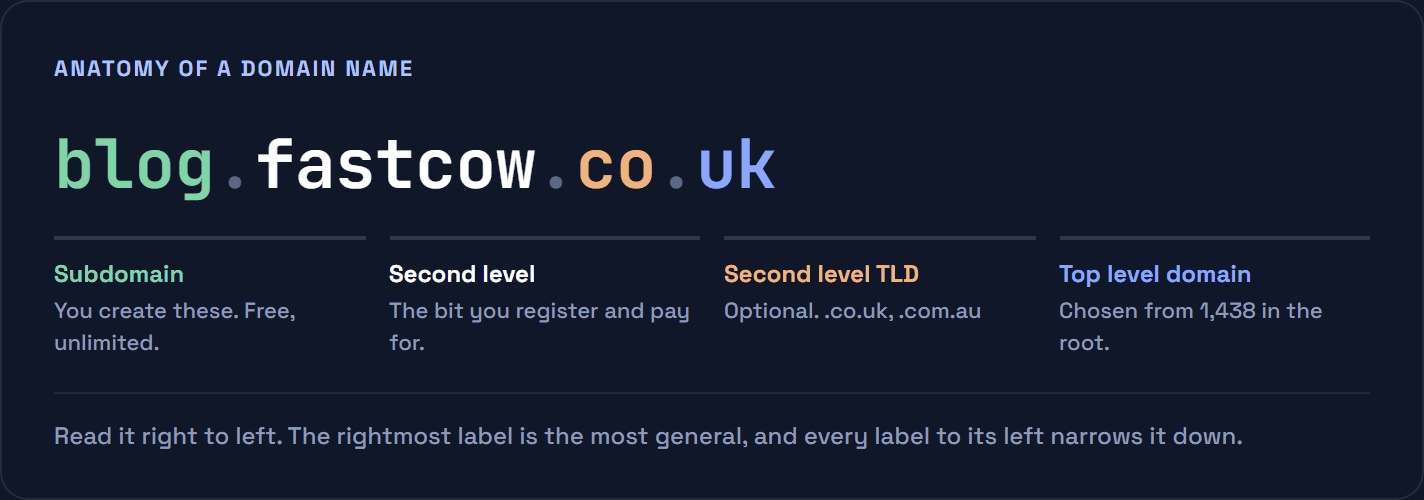
- Top level domain (TLD). The final label:
.com,.uk,.shop. You cannot invent one. It has to already exist in the internet root zone. - Second level domain. The part you choose and pay for. In
fastcow.com, that isfastcow. This is what people mean by “registering a domain”. - Second level TLD. Some countries add a category layer, so a UK business registers under
.co.ukrather than directly under.uk. Australia uses.com.au, Japan uses.co.jp. - Subdomain. Anything you add to the left, such as
blog.orshop.. These are yours to create, free, in unlimited numbers, and they are configured at your DNS host rather than bought.
Strictly, there is a silent final dot: fastcow.com. is the fully qualified name, and the trailing dot represents the root of the whole system. Browsers hide it. It only ever surfaces when you are editing DNS records by hand, where a missing trailing dot is a classic cause of a record that quietly does not work.
How a domain turns into a website
The system that translates names into addresses is DNS, the Domain Name System. It is a distributed directory, and no single machine holds all of it. Cloudflare has a good plain-English primer on what DNS is if you want more depth than this.
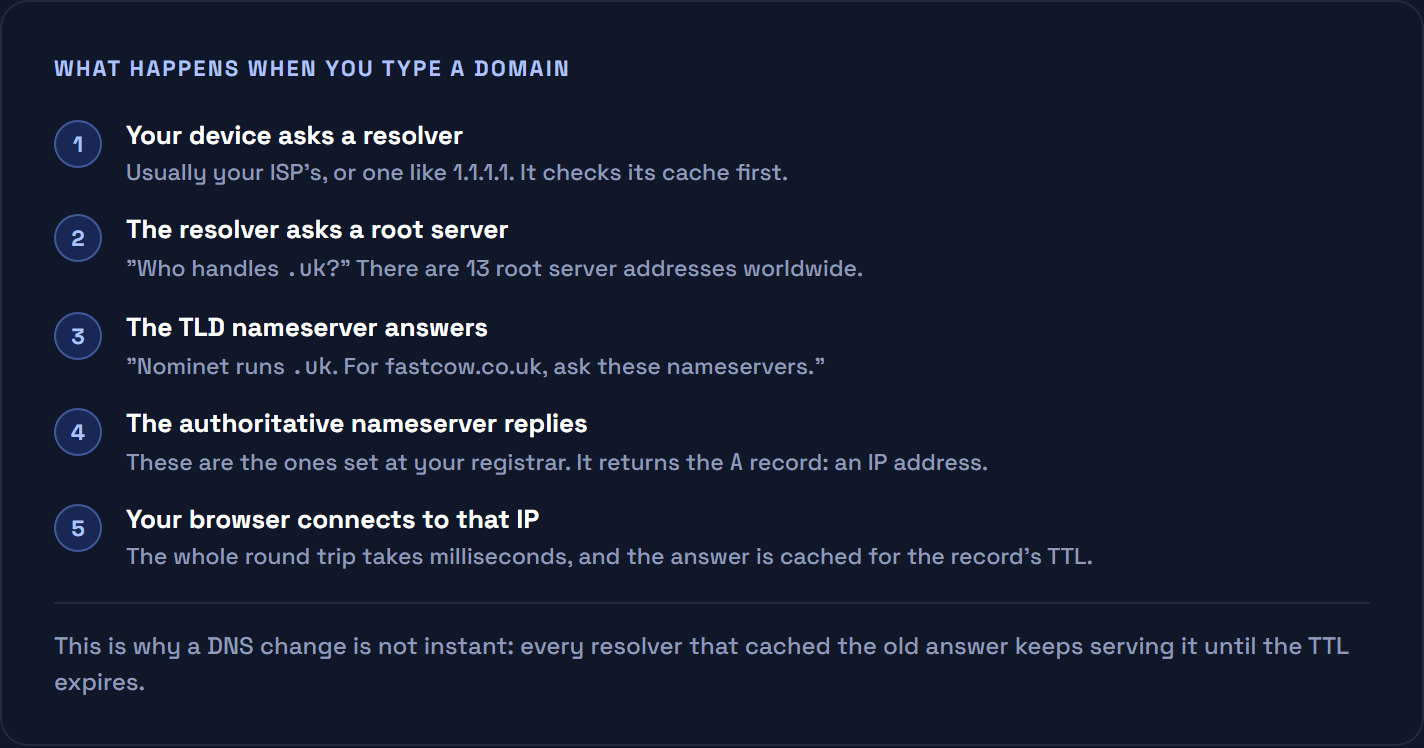
Two practical consequences fall out of that diagram. First, DNS changes are never instant: resolvers cache answers for the length of the record’s TTL, so lowering the TTL a day before a migration is the trick that makes the switchover feel immediate. Second, whoever controls your nameservers controls where your traffic goes, which is why registrar account security matters more than most people treat it.
The records themselves are worth knowing by name:
| Record | What it does |
|---|---|
A | Points the domain at an IPv4 address |
AAAA | The same for IPv6 |
CNAME | Points one name at another name |
MX | Where email for the domain should be delivered |
TXT | Free text, used for SPF, DKIM and domain verification |
NS | Which nameservers are authoritative for the domain |
The types of TLD available
As of the root zone published on 10 August 2026 there are 1,438 top level domains in existence. You can check that yourself: IANA publishes the complete list as a plain text file and a browsable Root Zone Database showing who operates each one.
| Type | Count | Examples | Who can register |
|---|---|---|---|
| Generic (gTLD) | 1,039 non-country endings | .com, .net, .org, .info | Anyone |
| New gTLD | .app, .dev, .shop, .xyz | Anyone, some with conditions | |
| Sponsored (sTLD) | Included above | .gov, .edu, .mil, .museum | Restricted, proof required |
| Country code (ccTLD) | 248 | .uk, .de, .jp, .ca | Varies by country |
| Internationalised | 151 | Non-Latin scripts, stored as xn-- | Varies |
| Infrastructure | 1 | .arpa | Nobody, technical use only |
Generic TLDs
The originals date from 1985: .com, .org, .net, .edu, .gov, .mil. .com was meant for commercial entities and is now simply the default, which is why it commands a premium and why almost every short one is long gone.
New gTLDs
In 2012 ICANN opened applications for new endings and roughly 1,200 arrived, which is where .shop, .online, .xyz, .blog and the rest came from. Two are worth singling out: .app and .dev are on the browser HSTS preload list, meaning HTTPS is enforced automatically and a site on one physically cannot be served over plain HTTP.
A second round is happening right now. ICANN’s 2026 application window opened on 30 April 2026 and closes on 12 August 2026, the first in more than a decade. This is for organisations wanting to run a whole ending such as .brand or .city, not for ordinary registrations, and the fees run to six figures. Expect the results to reach registrars over the following couple of years.
Sponsored and restricted TLDs
Some endings have a gatekeeper. .gov and .mil are United States government and military only. .edu is limited to accredited US institutions. .bank requires verification as a licensed bank. You cannot buy these, which is exactly why they carry weight, and why a phishing email from a .gov lookalike is almost always a different ending entirely.
Internationalised domain names
151 TLDs are in non-Latin scripts, so an address can be written entirely in Arabic, Cyrillic or Chinese. Because DNS itself only handles a limited ASCII character set, these are encoded into an xn-- prefixed form called Punycode, defined in RFC 3492. Your browser shows the readable version and resolves the encoded one. ICANN maintains a guide to IDNs covering the detail.
Worth knowing: because some scripts contain characters that look identical to Latin ones, IDNs have been used for spoofing. Browsers now display the Punycode form when a name mixes scripts suspiciously.
Got the domain. Need somewhere to point it?
Managed WordPress hosting on LiteSpeed with free Redis, DNS you control from one panel, and engineers who will move your site across by hand at no cost.
Country code domains explained
There are 248 two-letter country code TLDs, one for most countries and territories, assigned from the ISO 3166-1 country list. Each is run by that country’s own registry under its own rules, which is why they vary so much more than generic endings.
| ccTLD | Territory | Registry | Notes |
|---|---|---|---|
.uk | United Kingdom | Nominet | Usually registered as .co.uk |
.de | Germany | DENIC | One of the largest ccTLDs in the world |
.ca | Canada | CIRA | Canadian presence requirement |
.au | Australia | auDA | Australian presence requirement |
.jp | Japan | JPRS | Local presence for some categories |
.us | United States | Registry Services | US nexus requirement |
.eu | European Union | EURid | EU or EEA residency required |
Vanity country codes
A handful of ccTLDs got lucky with their letters and are now sold worldwide as branding rather than geography:
| Ending | Actually belongs to | Used for |
|---|---|---|
.io | British Indian Ocean Territory | Startups and developer tools |
.ai | Anguilla | Artificial intelligence companies |
.co | Colombia | A near miss for .com |
.tv | Tuvalu | Video and streaming |
.me | Montenegro | Personal sites and portfolios |
.ly | Libya | Word endings, as in bit.ly |
.fm | Micronesia | Radio and podcasts |
These are usually more expensive to renew than a .com, and they carry a risk generic endings do not: they belong to a territory, and territories change. .io is the live example. The UK and Mauritius signed a treaty in May 2025 to transfer sovereignty of the Chagos Archipelago, which is the territory .io is tied to, and the transfer was subsequently put on hold. ICANN published its own note on the situation, and the reassuring part is that retiring a ccTLD is a five year process even when it does happen. The honest summary is unresolved rather than urgent. If you are choosing an ending for a business you intend to run for twenty years, it is a factor worth a moment’s thought rather than a panic.
Country codes and search
A ccTLD is a strong geotargeting signal. Google treats .co.uk as aimed at the UK by default, which helps if that is your market and hurts if it is not. Generic endings can be geotargeted through other means instead. Google’s documentation on managing multi-regional sites is the authority here, and it matters more than most of the on-page work people do first.
Who actually sells domain names
Four roles, and confusing them is why domain problems are so often solved at the wrong company:
- ICANN coordinates the whole namespace and accredits registrars. It sells nothing.
- The registry operates a single TLD and holds its master database. Verisign runs
.com, Nominet runs.uk, DENIC runs.de. Registries do not usually sell to the public. - The registrar is the shop. Accredited by ICANN, it takes your money and your details and files the registration with the registry.
- The registrant is you, the person or company the domain is registered to.
ICANN publishes the full list of accredited registrars. Anyone selling you a .com is either on that list or reselling from someone who is.
The main names
GoDaddy is by a distance the largest, with more than 90 million domains under management. Namecheap is the best known value alternative. Cloudflare Registrar sells at cost with no markup and no upsells, though it only handles endings it supports and will not be for everyone. Squarespace acquired Google Domains in 2023 and absorbed its customers, so if you are looking for Google Domains, that is where it went. Country registries usually have their own list of local accredited registrars, which is often the easiest route for a ccTLD with residency requirements.
What to watch in the pricing
The advertised price is almost always a first-year promotion. The number that matters is the renewal, and the gap can be substantial: an ending offered at under two pounds for the first year can renew at thirty. Three things to check before you buy:
- The renewal price, not the first year. Multiply it by ten and see how you feel.
- Whether privacy is included. Many registrars charge for it. Some include it free. It should not be an extra.
- Transfer policy. A domain is locked for 60 days after registration or after a change of registrant, so you cannot immediately move away from a registrar you dislike. Our guide to transferring a domain away from GoDaddy walks through the mechanics, which are the same anywhere.
Renewals, expiry and getting a domain back
Registration periods run from one to ten years. What happens at the end is a fixed sequence that is worth knowing before you need it:
| Stage | Roughly | What it means |
|---|---|---|
| Expired | Day 0 | The site and email stop. You can usually still renew normally. |
| Grace period | Up to ~30 days | Renewal still available at the standard price. |
| Redemption | ~30 days after that | Recoverable, but with a redemption fee that is often 10 times the renewal. |
| Pending delete | ~5 days | Nothing can be done. |
| Released | After that | Anyone can register it, and dedicated services are watching. |
Exact windows vary by TLD, and ccTLDs often set their own. The practical advice is dull and effective: turn on auto-renew, register for several years at once on anything that matters, and keep the card on the account current. Set a calendar reminder as well, because auto-renew fails silently when the card expires.
Privacy, WHOIS and RDAP
Registration details used to be public through WHOIS, which meant your name, address, phone number and email were visible to anyone who looked. That changed twice. GDPR forced the redaction of personal data for anyone in scope, and then the protocol itself was retired: ICANN sunset WHOIS on 28 January 2025, replacing it with RDAP, the Registration Data Access Protocol. You can look up any domain through ICANN’s lookup tool.
In practice you will see the registrar, the creation and expiry dates, the nameservers and the domain status, while personal contact details are redacted behind a relay. Registrar-provided privacy services still have a role for the fields that remain public, particularly for organisations rather than individuals, and many ccTLDs set their own rules because ICANN’s policies do not bind them.
Keeping a domain secure
A domain is the single point of failure for a business online. Lose control of it and you lose the website, the email and every password reset that depends on that email, usually in that order and within minutes. It is worth more protection than it typically gets.
- Turn on registrar lock. Sometimes called transfer lock or
clientTransferProhibited. It blocks a transfer to another registrar until you deliberately unlock it, and it is free. - Put two-factor authentication on the registrar account, not just on your hosting. This is the account that can redirect your entire business to somebody else’s server.
- Register it to the company, not to a person. Use a role address such as domains@ rather than an employee’s personal mailbox. Recovering a domain registered to someone who left three years ago is genuinely difficult.
- Consider DNSSEC. It signs your DNS records cryptographically so a resolver can tell a forged answer from a real one. Most registrars and hosts can enable it in a click, and it costs nothing.
- Watch the expiry date yourself. Auto-renew is the right setting and it fails silently when a card expires. A calendar reminder a month out costs you nothing.
One more, because it catches people out at exactly the wrong moment: a domain is locked against transfer for 60 days after registration and after any change of registrant details. If you are planning to move registrars, do not update the owner information first, or you will start a two-month wait you did not need.
How to choose a domain name
Most advice here is generic. These are the parts that actually save money and regret:
- Say it out loud. If you have to spell it every time you give it to someone, it is the wrong name. Hyphens and numbers fail this test almost always.
- Check the trademark before the availability. An available domain that infringes a mark is not a bargain, it is a dispute waiting to happen through ICANN’s UDRP process.
- Match the ending to the audience. A UK plumber wants
.co.uk. A SaaS product selling worldwide wants.com. Neither should agonise about it. - Buy the obvious defensive registrations only. The matching
.co.ukand.comis sensible. Forty variations is a subscription you will resent. - Do not chase keywords. Exact-match domains stopped being a ranking shortcut well over a decade ago. A brandable name ages better.
Domain, hosting and website: what is what
Three separate things people buy on the same afternoon and then confuse forever:
| You buy | What it does | Analogy |
|---|---|---|
| Domain name | The address people type | Your street address |
| Hosting | The server your files live on | The building itself |
| Website | The design and content | What is inside it |
You can buy all three in one place, and plenty of people do. You do not have to, and there is an argument for not doing so: keeping the domain at a registrar separate from the host means a dispute with one company cannot hold the other hostage. What connects them is DNS. Point your domain’s nameservers at your host, and the address starts serving your site. If you are still working out which kind of hosting you need, our guide to the different types of hosting covers the options.
FAQs
It is the address people type into a browser to reach your website, such as fastcow.com. Behind it sits an IP address, a string of numbers that identifies the actual server. The domain name exists so people do not have to remember the numbers.
There are 1,438 in the internet root zone as of 10 August 2026, made up of 248 two-letter country codes, 151 internationalised endings in non-Latin scripts, and 1,039 generic endings such as .com and .shop. IANA publishes the full list, which changes as new endings are delegated and old ones retired.
The domain is part of the URL. In https://fastcow.com/pricing, the domain is fastcow.com, https:// is the protocol and /pricing is the path to a particular page. Every URL on your site shares the same domain.
Not in the sense of owning property. You hold an exclusive right to use it for the registration period you paid for, and you can renew that indefinitely. If you stop renewing, the registration lapses and the name eventually returns to the market for anyone to register.
A country code top level domain: a two-letter ending assigned to a country or territory, such as .uk, .de or .jp. Each is run by that country under its own rules, and some require a local presence or residency to register.
Yes. Several country codes are sold globally as branding rather than geography, .io and .ai among them. Be aware they usually renew more expensively than a .com, and that they remain tied to a territory. The status of .io is currently unresolved following the treaty over the Chagos Archipelago, though any retirement of a ccTLD runs to a five year process.
No. The domain is the address; hosting is the server that stores your files and serves your pages. They are separate purchases and can be bought from different companies. DNS is what connects the two.
A common .com is usually between eight and fifteen pounds a year. Country codes and newer endings range from a couple of pounds to several hundred. Always check the renewal price rather than the first-year offer, because the gap between them is where the surprises live.
It expires and your site and email stop working. There is normally a grace period of around 30 days at the standard price, then a redemption period where recovery costs considerably more, then a short pending-delete window, after which anyone can register it. Auto-renew and a current payment card prevent all of this.
ICANN sunset WHOIS for generic domains on 28 January 2025 and replaced it with RDAP. You can still look up registration data, through ICANN’s lookup tool or your registrar, but personal contact details are redacted. Some country code registries still run their own WHOIS because ICANN policy does not bind them.
The short version
A domain name is a rented address that points at a server. It is read right to left. The ending is chosen from 1,438 that exist, split between generic endings anyone can register, country codes with their own local rules, and restricted ones you cannot buy at all. You register it through an ICANN accredited registrar, which is a shop sitting between you and the registry that runs that ending.
Pick something you can say over the phone, check the renewal price rather than the first-year offer, turn on auto-renew, and keep the registrar account secure. Then point it at a host that can actually serve the site quickly, which is the part we can help with.